01 / 04
Knowing when a lookalike will mislead you
ClientLens is an AI lookalike feature shipped inside TeamForce CRM. Finding lookalike clients is easy. The product is knowing when a lookalike will mislead you.
Retention agents at online brokerages grouped clients by labels like “VIP” and “Gold Trader”, then sent the wrong campaigns to clients who only looked alike.
the problem
Two clients with the same tags. Opposite strategies.
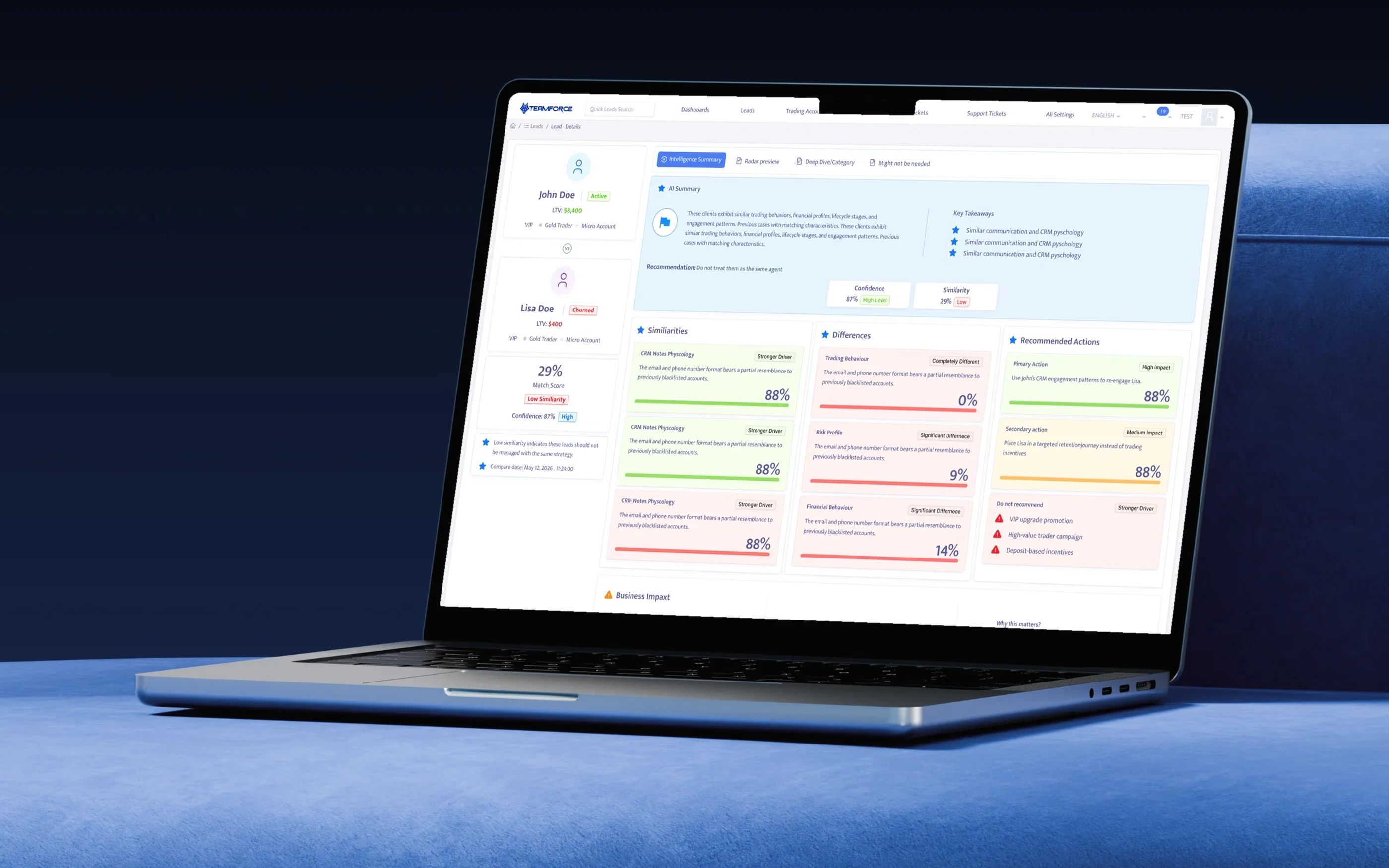
John and Lisa are both tagged VIP, Gold Trader and Micro Account. John is active and worth $8,400. Lisa has churned and is worth $400. In the CRM they looked identical, so they received the same deposit bonus campaign. For Lisa that campaign was the most common trigger of compliance complaints on churned accounts. The labels described who clients were when they signed up, not how they behave now.
ClientLens answers the comparison and shows its reasons. The agent still decides. It makes the comparison explicit, explained and recorded.
system · pipeline
Designed as a system, delivered alongside engineering.
The screens are the visible part of a pipeline: CRM events become features, features become scores, scores become structured claims, and claims become one family of cards. I designed the card system and the data contract with the engineers who built them.
Each layer answers one question, and the interface can always trace a claim back to its source.
Interface
Requests carry the agent's desk and permissions.
- Lead record · Find Similar Leads
- AI insight tab slot
- Intelligence Summary
- Radar Preview
Insight API
- Permission + masking
- Structured insight contract
- Feedback capture
AI boundary
- Summaries from structured scores only
- Rule check: no incentives to high-risk profiles
- Top 50 pre-generated, rest on demand
Scoring
- Similarity per category
- Confidence from coverage
- Risk resemblance
- Nightly batch · 02:00 UTC
Features
- 8 categories × 16 features
- Trading · financial · calls · notes · marketing · lifecycle · lead source · risk
components · insight card
One card anatomy for every AI claim, so agents learn to read it once.
Similarities, differences, actions and risk flags all use the same five parts. Because the anatomy is fixed, engineers could build one Ant Design component with variants instead of six bespoke panels, and the next AI insight in the tab slot (the Fraud Risk Index team adopted it next) inherits the same reading pattern.
1
Category
Named the way agents talk about it, not after the model's feature.
2
Verdict tag
A fixed vocabulary: Stronger driver, Significant difference, Completely different, High or Medium impact.
3
Reason
One sentence built from the structured scores. Never free-form model text.
4
Value
Large, so it can be scanned across a row of cards.
5
Semantic bar
Green for alike, red for different, amber for “act with care”. Colour always repeats the tag, never replaces it.
Variants: similarity, difference, primary action, secondary action, do not recommend and risk flag.
engineering · collaboration
How design and engineering shipped it together.
Weeks 1–3
Contract before pixels
The back-end lead and I wrote the insight response schema together, so every UI element had a field to come from and nothing was hard-coded.
Weeks 4–8
States as specs
I delivered every state as a spec: loading, generating, low coverage, no matches, permission-masked and scoring stale. QA tested against those.
Weeks 6–11
Pilot behind a flag
The feature shipped to 2 retention desks, 38 agents, behind a feature flag. We reviewed usage and feedback with data science every week.
Weeks 12–14
Tune, then roll out
The threshold default, summary wording and the Do not recommend rules were tuned from pilot data, then rolled out to all desks.
The insight contract · GET /leads/{id}/compare/{otherId}
One response drives the whole Intelligence Summary
- matchScore: 29
- similarity: low
- confidence: 87
- comparedAt: 2026-05-12T11:24:00Z
- recommendation: separate_strategy
- categories: crm_notes_psychology 88 (stronger_driver), trading_behaviour 0 (completely_different)
- actions: primary, high impact, reuse_engagement_pattern
- doNotRecommend: vip_upgrade, high_value_campaign, deposit_incentive
outcomes
Results from the pilot and the first quarter after launch.
Measured over 6 weeks on two pilot desks against two comparable desks without ClientLens, then tracked for one quarter after general availability.
64%
Weekly use
Of pilot agents used Find Similar Leads every week by week 6.
38 → 9 min
Segment build time
Median time to build a re-engagement segment.
−41%
Mis-targeted promotions
VIP and deposit promotions sent to churned or high-risk clients.
11.8% vs 8.6%
Re-deposit rate
On ClientLens-guided outreach compared with control desks.
The pilot covered 38 agents on the 2 retention desks. Segment build time is a median, and the re-deposit rate compares ClientLens-guided outreach with the control desks.
Feedback theme · agents
“Do not recommend” was the most mentioned feature. Agents said it gave them a reason to refuse a manager's request to “just send the VIP offer”.
Feedback theme · retention leads
Leads used impact tags to plan the day's comparisons, which we hadn't designed for.
Feedback theme · compliance
Hashed matches and the deposit-incentive rule cleared review without changes.
honest read
What didn't work, and what's next
The radar is under-used: opened in 22% of comparisons, because most agents act from the summary. It earns its place as evidence, not as the default view. Overnight scores confused some agents, since a client who deposited that morning still showed as churned. The compare date helped, but not completely. Imported leads with little data produced cautious, unhelpful verdicts. Coverage on the record explained why, but didn't fix it.
Next: Deep Dive by category, the view cut from v1, for retention leads who audit strategies. Intra-day re-scoring for clients with new deposits or tickets, so the most urgent cases aren't a day old. Close the loop by recording which recommended action an agent took and its result, so confidence learns from outcomes rather than only data coverage. And a “Disagree” option on each verdict, routed to data science as labelled training examples.
Similar isn't the same. ClientLens shows agents the difference before they act on it.
Informative Nudge
Next