01 / 04
Knowing when a lookalike will mislead you
ClientLens is an AI lookalike feature shipped inside TeamForce CRM. Finding lookalike clients is easy. The product is knowing when a lookalike will mislead you.
Retention agents at online brokerages grouped clients by labels like “VIP” and “Gold Trader”, then sent the wrong campaigns to clients who only looked alike.
the problem
Two clients with the same tags. Opposite strategies.
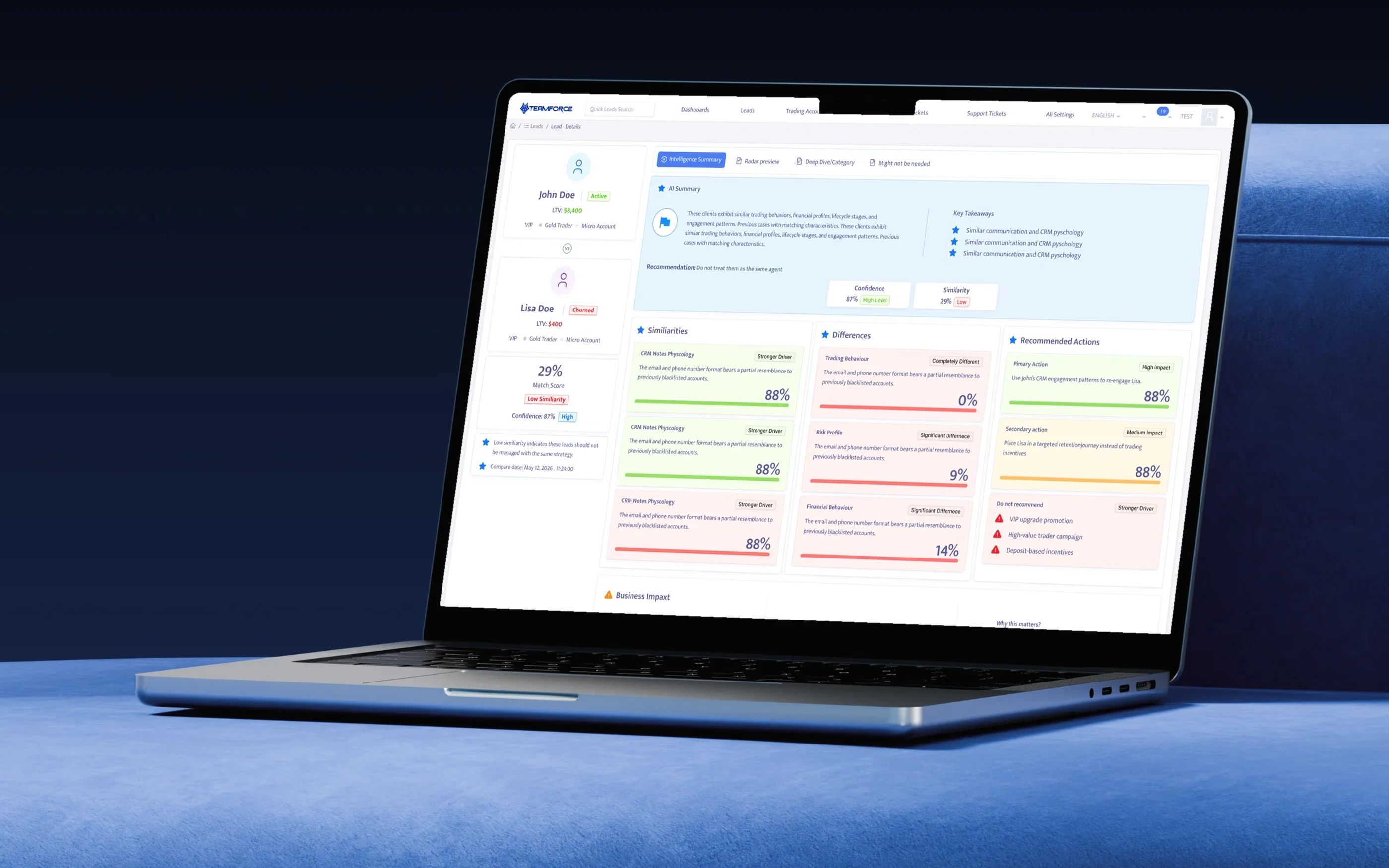
John and Lisa are both tagged VIP, Gold Trader and Micro Account. John is active and worth $8,400. Lisa has churned and is worth $400. In the CRM they looked identical, so they received the same deposit bonus campaign. For Lisa that campaign was the most common trigger of compliance complaints on churned accounts. The labels described who clients were when they signed up, not how they behave now.
ClientLens answers the comparison and shows its reasons. The agent still decides. It makes the comparison explicit, explained and recorded.
before / after
Agents segmented by memory and tags. The CRM now answers the comparison and shows its reasons.
The decision that matters most, “is this client like that one?”, used to happen in someone's head.
Before ClientLens
Agents segmented by memory and tags.
The decision that matters most, “is this client like that one?”, happened in someone's head.
- Open the lead record: 60+ fields across 7 panels (agent)
- Filter the leads list by tags and country (agent)
- Export to a spreadsheet and sort by deposits (agent)
- Guess which clients “behave like” a known good one (unrecorded)
- Apply the VIP playbook to the whole list (mis-targeted)
With ClientLens
The CRM answers the comparison and shows its reasons.
The agent still decides. ClientLens makes the comparison explicit, explained and recorded.
- Click Find Similar Leads on the record (agent)
- Rank lookalikes across 8 behaviour categories (AI)
- Read the lead's risk, re-deposit chance and best channel (AI)
- Compare a pair: verdict, confidence, do and don't (confidence)
- Choose the action and log it on the record (agent)
Design challenge
How might we help agents reuse what worked for one client on others, without letting surface similarity push them into the wrong strategy?
constraints
Shipped inside a CRM agents already used all day.
This wasn't a blank canvas. ClientLens had to live in a six-year-old lead record, on a fixed component library, with data that was often incomplete and scores that could not be computed live. Each constraint shaped a specific design decision.
Legacy system
A crowded lead record we couldn't redesign
The lead page carries Details, Advance Details, Device, Custom Fields, KYC, Marketing and Transactions. Three other teams own panels on it, so a page redesign was off the table.
Design response: entry is one button in the existing action row. The results open in the page's existing AI insight tab slot rather than a new page.
Technical limit
Similarity is scored overnight, not live
Scoring every lead against roughly 1.4M records in real time was too expensive for the database cluster. Engineering moved scoring to a nightly batch.
Design response: every comparison shows its compare date. Results never look live, and agents can tell when a client changed after scoring.
Technical limit
AI summaries were slow and costly
Generating a written summary took 4–6 seconds per lead. Doing it for 1,200 matches on page load was not an option.
Design response: summaries are pre-generated for the top 50 matches and created on demand after that. The list never waits on the model.
Data quality
Many records were half empty
Imported leads often lacked trading history or notes. A match built on thin data looks just as confident as one built on rich data unless you say otherwise.
Design response: Profile Data Coverage (15 of 16 features, 92%) sits on the lead record, and confidence is shown on every verdict.
Compliance
Agents can't browse other clients' details
Lookalikes can belong to other desks and regions. Compliance ruled that matched clients appear only with hashed IDs unless the agent has access to that record.
Design response: match cards lead with the reasons for the match, not personal data. View Profile respects the agent's existing permissions.
Business priority
A retention target and a fixed date
The retention desks had a quarterly re-deposit target, and the feature had to land before the Q2 campaign season.
Design response: we cut the Deep Dive per-category view from v1 and shipped the decision path first: find, compare, act.
iterations · v1 to v4
From a similarity badge to a verdict with guardrails.
ClientLens went through four versions. Each fixed a specific way agents misused the previous one.
v1 · Badge
A match % on the leads list
A single similarity number next to each lead, sorted from highest to lowest.
What we learned: in the first prototype test, 6 of 8 agents treated 70%+ as “same client, same campaign”.
v2 · Breakdown
Per-category scores
The match split into categories, so a high overall score could show a 0% gap in trading behaviour.
What we learned: agents saw the gap but still didn't know what to do differently. Information isn't a decision.
v3 · Verdict
Recommendation + confidence
A plain answer, “treat as one segment or not”, with confidence shown as its own number.
What we learned: engineering found that confidence followed data coverage. That is why coverage moved onto the lead record.
v4 · Shipped
Actions, anti-actions, impact
Primary and secondary actions, a Do not recommend list, business impact and the radar as supporting evidence.
What we learned: compliance review asked for the Do not recommend list after seeing deposit incentives offered to churned clients.
model · two axes
Similarity and confidence are different questions. Merging them hides the dangerous case.
Early specs had one “match quality” number. I argued for two: how alike two clients are, and how sure ClientLens is about it. The John/Lisa case shows why. A low match with high confidence is the most useful thing the system can say, because it stops a mistake. A single number would show it as a weak result and agents would skip it.
High confidence · low similarity
Don't share a strategy
ClientLens is sure they differ. The verdict says so and names what not to do.
John vs Lisa · 29% · 87%
High confidence · high similarity
Reuse what worked
The primary action carries over, with the channel and timing from the better-performing client.
Typical top matches · 76%
Low confidence · low similarity
Treat as a hint
No recommendation is shown as certain. The UI points to the missing data instead.
Low confidence · high similarity
Looks alike, unproven
The most tempting case to over-trust. The confidence label keeps the agent careful.
ownership · mine vs ours
Which decisions I made, and which ones the team made.
Decisions I owned
Answer “should these share a strategy?”, not “how similar?”
I reframed the brief from a similarity search into a decision aid. It changed the output from a ranked list into a verdict.
Decisions I owned
Two numbers: similarity and confidence
I took this to the data scientist and the PM with the John/Lisa case as evidence.
Decisions I owned
Do not recommend as a first-class pattern
A negative action list, styled the same as recommendations, so it isn't read as a footnote.
Decisions I owned
Read the client before the list
The anchor panel comes before the matches to break the copy-the-top-match habit.
Decisions I owned
The insight card system
One card anatomy for every AI claim, built in the existing Ant Design library.
Engineering lead
Nightly batch scoring
Infrastructure cost made live scoring infeasible. My response was to surface the compare date.
Data science · co-designed labels
Eight scoring categories, 16 features each
The data science model. I named the categories with agents so the labels match how they talk.
Compliance
Hashed IDs for matched clients
Required for cross-desk privacy. I designed the match card to work without personal data.
PM
Cutting Deep Dive from v1
Scope trade-off for the Q2 date. I argued for the radar as the lighter evidence view instead.
Data science + me
Default threshold of 30%
Picked from pilot data on which matches agents actually opened.
working with the team
One number became two, and the verdict shows both.
Early specs had a single “match quality” number. I argued for two, how alike two clients are and how sure ClientLens is about it, and took the John and Lisa case to the data scientist and the PM as evidence: a low match with high confidence is the most useful thing the system can say, and one number would hide it. The verdict now shows both.
Day to day I worked with the back-end lead on the insight contract, with data science on the eight scoring categories, and with compliance on hashed IDs and the Do not recommend list.
boundaries · AI vs agent
ClientLens can recommend. It never acts on the client.
AI may do
Without asking
- Score lookalikes across categories
- Summarise a match in plain language
- Recommend and rank actions
- Flag risk resemblance to restricted users
AI shows, with context
Always qualified
- Confidence beside every verdict
- Compare date for every score
- Data coverage for the source lead
- The reason behind each recommendation
Agent decides
Human action
- Which matches to compare
- Whether to follow a recommendation
- Which campaign or journey to use
- Opening a profile, within existing permissions
Must never
Hard limits
- Enrol a client in a campaign automatically
- Change tags, status or VIP level
- Reveal personal data across desks
- Recommend deposit incentives to high-risk profiles
trade-offs · what it cost
The trades we made to ship on time inside the existing CRM.
Chose
Overnight scores with a visible date
Over: live scoring on every click.
Cost: a client who deposits at noon looks the same until tomorrow. The date makes that visible.
Chose
Fit into the existing tab slot
Over: a dedicated ClientLens page.
Cost: less room for the comparison. We accepted a two-column layout that scrolls.
Chose
A verdict
Over: neutral data that lets agents decide.
Cost: being wrong is more visible. Confidence and the radar keep the verdict open to challenge.
Chose
Radar as the evidence layer
Over: the full per-category Deep Dive.
Cost: less detail for power users. Deep Dive is on the roadmap.
Chose
Pre-generated summaries for top matches
Over: a summary for every match, always.
Cost: matches past the first 50 show “Generating…” briefly when opened.
honest read
What didn't work, and what's next
The radar is under-used: opened in 22% of comparisons, because most agents act from the summary. It earns its place as evidence, not as the default view. Overnight scores confused some agents, since a client who deposited that morning still showed as churned. The compare date helped, but not completely. Imported leads with little data produced cautious, unhelpful verdicts. Coverage on the record explained why, but didn't fix it.
Next: Deep Dive by category, the view cut from v1, for retention leads who audit strategies. Intra-day re-scoring for clients with new deposits or tickets, so the most urgent cases aren't a day old. Close the loop by recording which recommended action an agent took and its result, so confidence learns from outcomes rather than only data coverage. And a “Disagree” option on each verdict, routed to data science as labelled training examples.
Similar isn't the same. ClientLens shows agents the difference before they act on it.
Informative Nudge
Next