01 / 04
Knowing when a lookalike will mislead you
ClientLens is an AI lookalike feature shipped inside TeamForce CRM. Finding lookalike clients is easy. The product is knowing when a lookalike will mislead you.
Retention agents at online brokerages grouped clients by labels like “VIP” and “Gold Trader”, then sent the wrong campaigns to clients who only looked alike.
the problem
Two clients with the same tags. Opposite strategies.
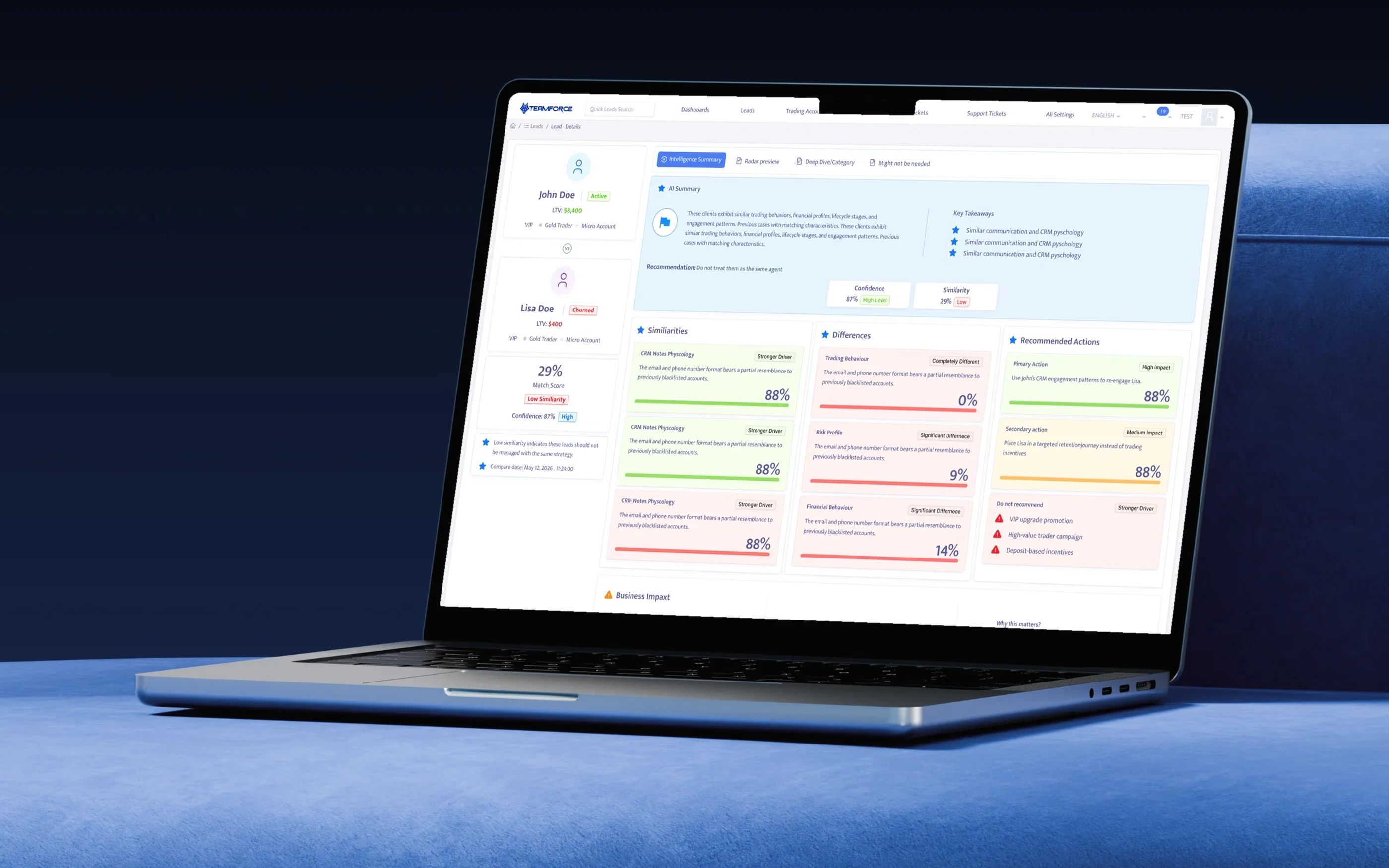
John and Lisa are both tagged VIP, Gold Trader and Micro Account. John is active and worth $8,400. Lisa has churned and is worth $400. In the CRM they looked identical, so they received the same deposit bonus campaign. For Lisa that campaign was the most common trigger of compliance complaints on churned accounts. The labels described who clients were when they signed up, not how they behave now.
ClientLens answers the comparison and shows its reasons. The agent still decides. It makes the comparison explicit, explained and recorded.
the experience
From one lead to a confident decision about many.
The flow runs Lead record, Similar leads, Select, Intelligence Summary and Radar Preview. Each step answers one question, and every AI claim on screen carries its reason and how confident it is.
Shipped
- Find Similar Leads on every lead record
- Ranked lookalikes with an AI summary per match
- Pairwise comparison: Intelligence Summary and Radar Preview
I owned
- Framing the feature as a verdict, not a similarity search
- Separating confidence from similarity
- The insight card system and the “Do not recommend” pattern
Team decisions
- Nightly batch scoring, not real-time (engineering)
- The 8-category feature model (data science)
- Hashed identities for other clients (compliance)
Measured
- 64% weekly use across pilot desks
- Segment build time 38 to 9 min
- 41% fewer mis-targeted promotions
Intelligence Summary
1
A verdict, not a score.
The headline answers the agent's real question: can these two clients share a strategy?
Intelligence Summary
2
Confidence is separate from similarity.
“29% similar, 87% confident” means the AI is sure they're different. Merging the two numbers would hide that.
Intelligence Summary
3
What not to do.
The campaigns that would backfire are named, next to the ones that would work.
Intelligence Summary
4
The cost of ignoring it.
The impact panel describes what goes wrong if the two are put in one segment.
entry · lead record
One button in the row agents already use, and a signal of how much the AI can know.
Find Similar Leads sits next to Send push notification and Add to WhatsApp, in the action row agents use dozens of times a day. Nothing else on the record moved.
Below it, Profile Data Coverage shows how complete the record is in each feature group. It answers a question agents ask before trusting any AI output: what does it actually know about this person? A client with 6 of 16 features filled gets weaker matches, and the agent can see that before clicking.
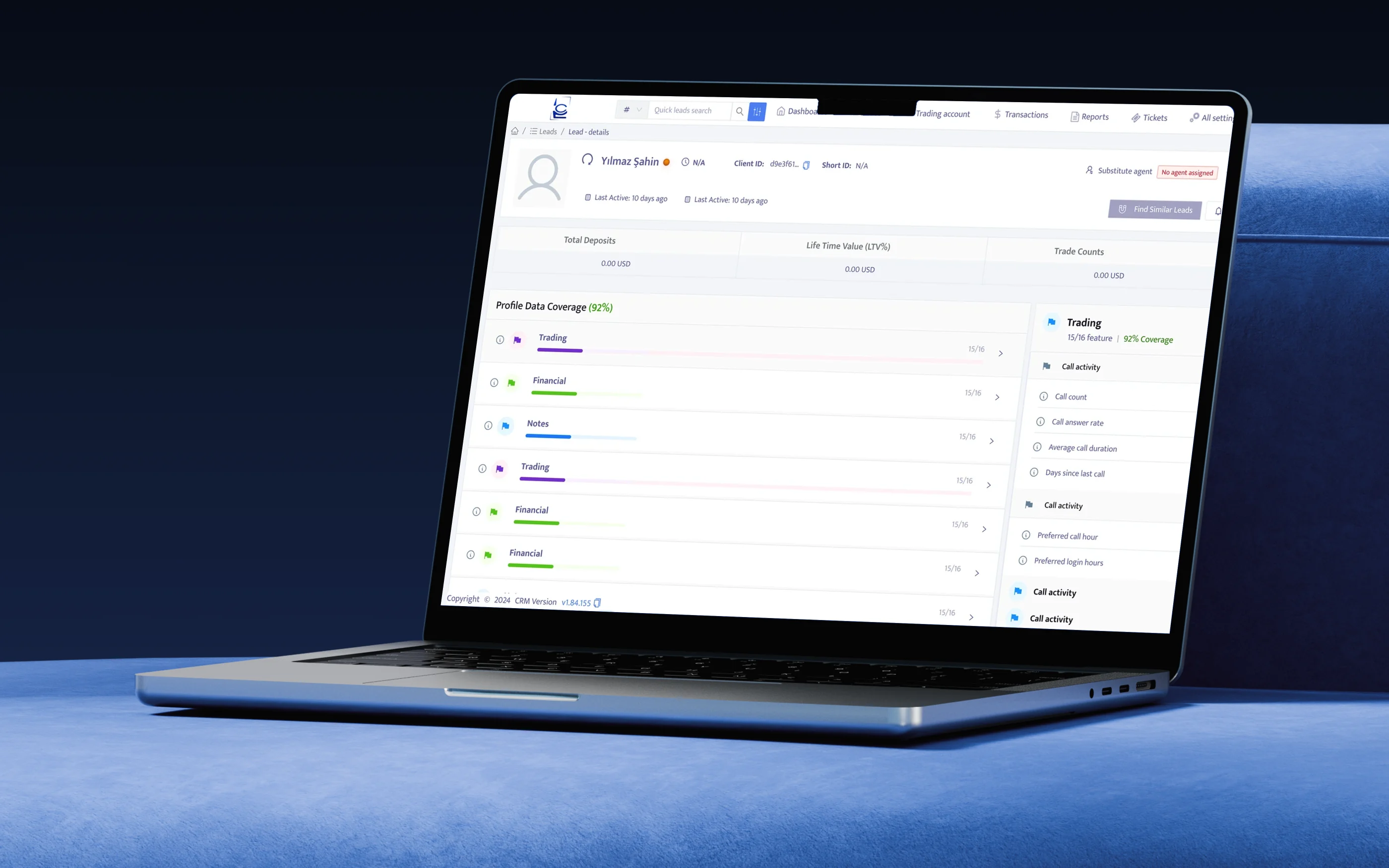
The entry point sits in the existing action row. Data coverage is shown by feature group. Each group opens into the raw signals behind it, such as call count, answer rate and preferred call hour.
discover · AI read, explained
Before showing anyone else, tell the agent what ClientLens sees in this client.
The left column reads the client: risk flag, re-deposit chance, re-engagement likelihood and best channel. Underneath is the reason, written plainly: clients like this one responded to these actions.
I put this before the list on purpose. In early sessions with 8 agents, people jumped straight to the top match and copied its playbook. Making them read the client first slowed that habit down.
Risk is a coloured label and probability is a word plus a number, so neither is a bare percentage. “Medium” re-deposit chance is a judgment an agent can act on. 0.47 is not.
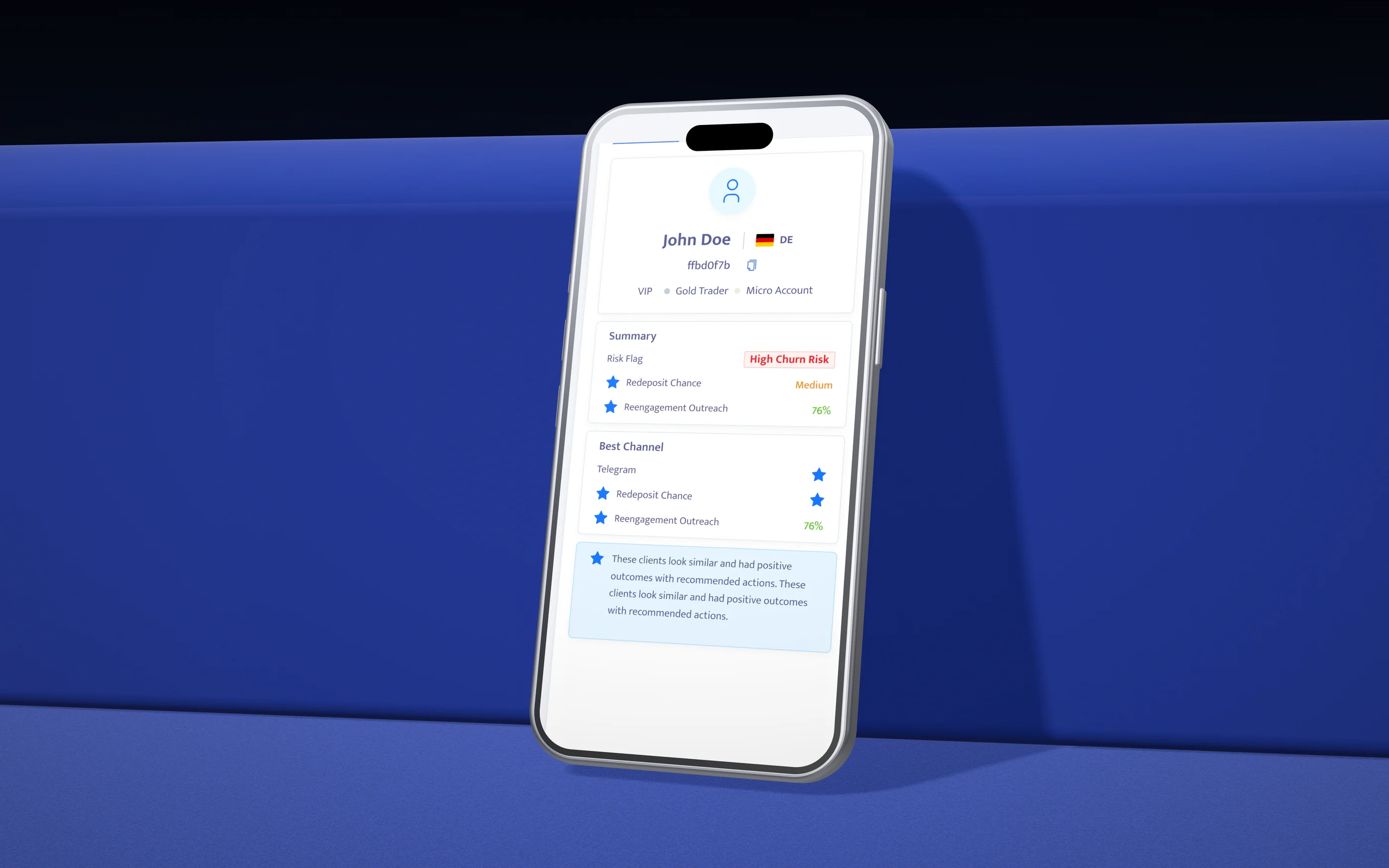
Risk comes first, then the channel to use, then why ClientLens believes it.
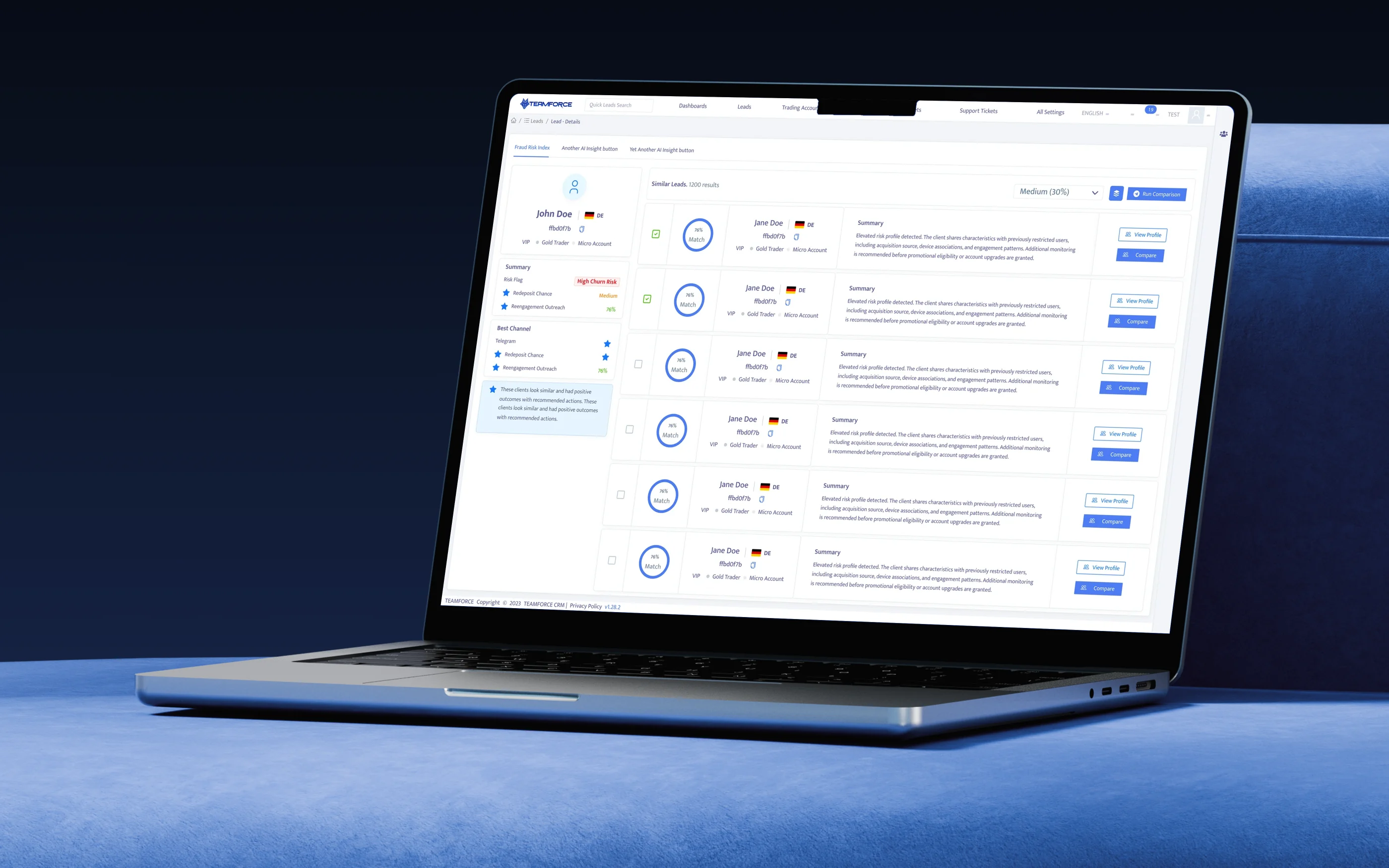
The match threshold defaults to Medium (30%), with the tolerance written next to the label. Match strength is a ring with a number. Each match comes with an AI summary that leads with risk; here it warns that the client resembles previously restricted users. Agents tick the matches they want to examine, and Run Comparison works on the selected set.
compare · verdict, confidence, action
The comparison ends in a recommendation the agent can act on, or refuse.
The summary reads top to bottom like a decision. AI Summary gives the recommendation and its confidence. Similarities and Differences are scored by category, each labelled “Stronger driver”, “Significant difference” or “Completely different”. Recommended Actions are tagged by impact. Business Impact explains what goes wrong if the agent ignores the recommendation.
The column I fought hardest for is Do not recommend. Positive recommendations alone kept leading agents to add the VIP playbook “just in case”. Naming the campaigns that would backfire, here a VIP upgrade, a high-value campaign and deposit incentives, turned a suggestion into a guardrail.
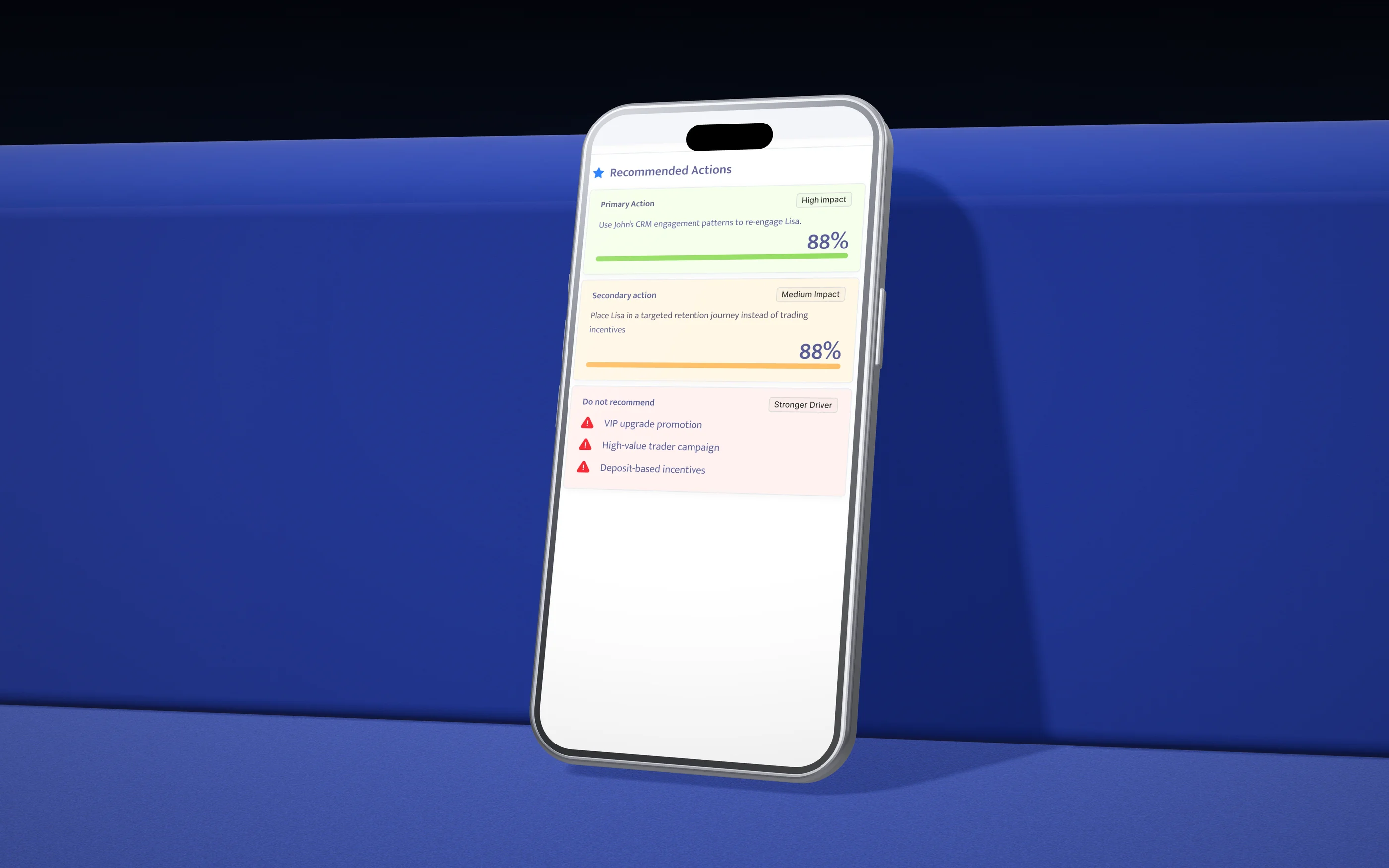
A primary and a secondary action, each with an impact tag, and below them the Do not recommend list.
Why actions instead of segments? The first version produced a segment, “clients like John”, and left the strategy to the agent. Agents read that as “treat them like John”. Writing the action, use John's engagement patterns, not his incentives, keeps what transfers (communication style, timing) apart from what doesn't (deposit behaviour).
Why impact tags? Retention leads asked in the pilot how to prioritise when a desk has 40 comparisons open. High and medium impact gave them a triage order without another screen.
explain · evidence layer
One shape that shows where two clients overlap and where they come apart.
A 29% match is an abstraction. The radar plots both clients across the eight categories used for scoring: trading, financial, CRM notes psychology, communication, risk, marketing, lead source and lifecycle. The shaded overlap is where the strategies can be shared.
Radar charts are easy to misread, so the help is built into the page rather than a tooltip. How to read the radar explains the centre, the edge and the overlap. What does this mean? turns the shape into a sentence.
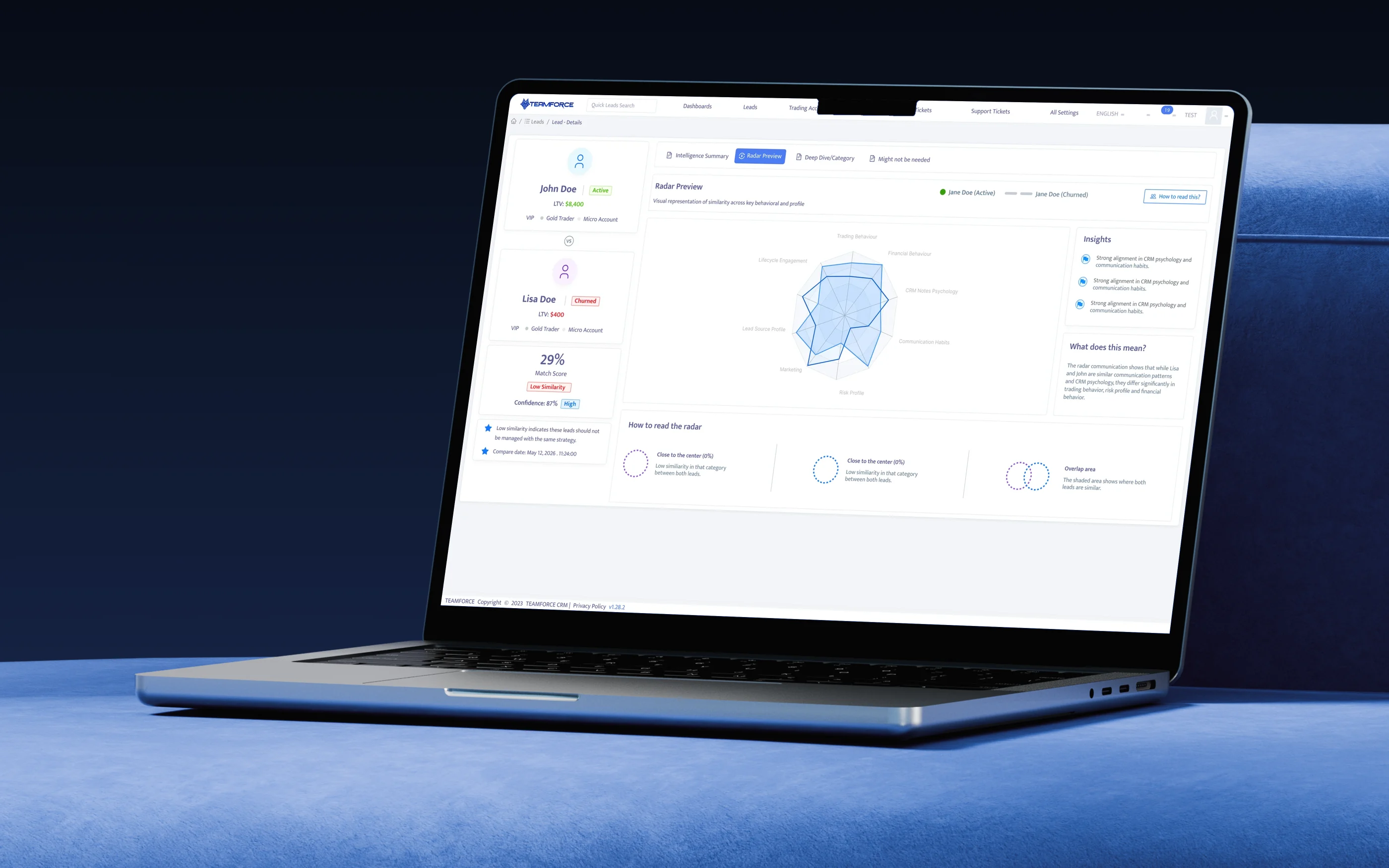
Two shapes, one overlap. Insights pick out the strongest alignment, a plain-language reading explains it, help is one click away, and a legend covers the three patterns that matter.
Screens are from the shipped design. Client names and IDs are test data.
honest read
What didn't work, and what's next
The radar is under-used: opened in 22% of comparisons, because most agents act from the summary. It earns its place as evidence, not as the default view. Overnight scores confused some agents, since a client who deposited that morning still showed as churned. The compare date helped, but not completely. Imported leads with little data produced cautious, unhelpful verdicts. Coverage on the record explained why, but didn't fix it.
Next: Deep Dive by category, the view cut from v1, for retention leads who audit strategies. Intra-day re-scoring for clients with new deposits or tickets, so the most urgent cases aren't a day old. Close the loop by recording which recommended action an agent took and its result, so confidence learns from outcomes rather than only data coverage. And a “Disagree” option on each verdict, routed to data science as labelled training examples.
Similar isn't the same. ClientLens shows agents the difference before they act on it.
Informative Nudge
Next